
Learning Genie for Parents
Learning Genie IncEducation
4.9361.00 Reviews
- Version
- 5.0.29
- Installs
- 100.00K
- Age Rating
- Everyone
Screenshots
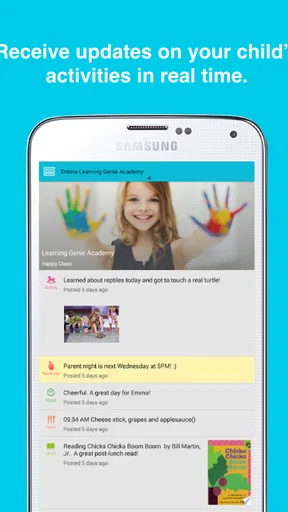
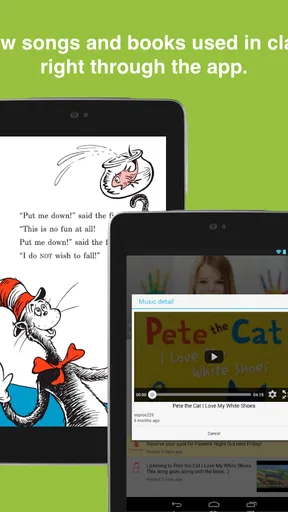
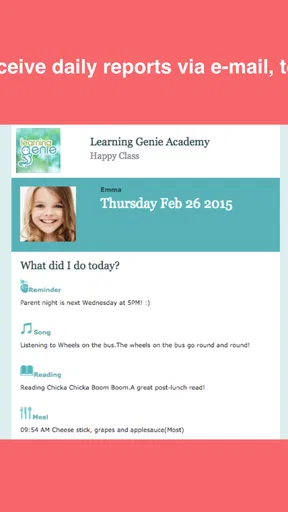
Our Review of Learning Genie for Parents
 Analysis by Appyee
When a child spends part of the day in an early-learning program, the small details can easily get scattered between pickup conversations, paper notes, and messages. Learning Genie for Parents is designed for that gap. I found it most useful as a shared window into a child’s day, especially when more than one trusted adult needs to stay informed without relying on a single person to remember every update.
This is an education app for families developed by Learning Genie Inc. It is free, rated for Everyone, and has built a sizeable user base, with over one hundred thousand installs and an average rating of 4.9 from around one and a half thousand ratings. Those figures suggest that it has found a clear audience among parents and caregivers, but the important question is whether its style of communication fits the way your household actually works.
How it fits into a shared household routine
The most realistic use case is not constant checking. It is a quick routine around the child’s day. One parent might look at a photo during a lunch break, another caregiver might review a daily report before pickup, and a grandparent could be brought into the conversation when they are helping with childcare. The value comes from keeping those observations close to the people who need them, rather than turning every update into a separate text message.
I would treat the app as a companion to the relationship between a family and an early-learning provider, not as a replacement for direct conversation. A photo or report can help me understand what happened, but it does not necessarily explain the full context. If a child seems tired, unusually quiet, or upset, I would still ask the teacher or caregiver what they noticed. The app is strongest at preserving everyday communication, not at interpreting it for me.
On a shared tablet, the experience calls for a little discipline. If several adults use the same device, I would make checking the app part of a deliberate routine and avoid leaving it open where a child can browse through adult communication. That is not a criticism of a specific feature; it is simply sensible household practice whenever family information is accessed from a common screen.
A useful habit is to decide who checks updates and when. Without that agreement, two adults may assume the other has already seen a report, or both may repeatedly check for the same information. Learning Genie for Parents can support coordination, but the household still needs a clear understanding of responsibility. A short evening check can be more effective than everyone watching for notifications throughout the day.
What the photo and report format does well
Photos make the child’s day feel more concrete. A brief image can give a parent a starting point for a conversation: what activity was happening, who was there, or what the child enjoyed. Daily reports are more practical when I need a quick sense of the day rather than a long exchange. Together, those forms of communication can help a caregiver ask better questions at home.
The trade-off is that snapshots naturally emphasize selected moments. A cheerful photo does not mean the entire day was effortless, just as a short note about a difficult moment does not define the child’s experience. I appreciate the convenience, but I would avoid using individual updates as a scorecard for the program or for the child. The app works best when I read it as one part of an ongoing picture.
One non-obvious benefit is the way it can reduce repeated questions at pickup. If I have already seen a basic update, I can use that limited face-to-face time for something more useful, such as asking about a change in mood or following up on a new interest. That makes the app valuable even when the information itself is brief.
Setting boundaries before several adults use it
The first boundary I would establish is who should have access to the child’s updates. In a household with separated parents, relatives, babysitters, or rotating caregivers, “shared” does not automatically mean “open to everybody.” The right arrangement depends on the adults responsible for the child and on the communication practices of the learning setting. I would agree on the intended users before adding the app to multiple devices.
That conversation matters because the app can become part of a family’s record of the child’s day. A parent may want every photo and report immediately, while a grandparent may only need occasional information. A babysitter may need practical context for pickup but not every family discussion. Keeping those roles distinct helps prevent confusion and avoids making one person the unofficial messenger for everyone else.
If I were setting it up on a shared device, I would also separate the app’s use from a child’s own screen time. This is a parent-facing communication tool, not an activity I would hand to a young child as entertainment. The Everyone age rating describes the app’s general suitability, but it does not change the fact that the content concerns a particular child and should be viewed thoughtfully by the adults responsible for them.
The app’s minimum operating-system requirement is Android 5.0, which makes it accessible on many older Android devices. That can be helpful for a household that keeps an older phone or tablet for family tasks. At the same time, an older device may have slower performance, less comfortable reading, or limited storage. I would test the experience on the actual device used by the caregiver rather than assuming that compatibility alone guarantees convenience.
The current version is 5.0.29. I would keep the installation reasonably current, especially if the app is central to daily communication. Updates can affect reliability and compatibility, and a forgotten older installation can become a weak point in a routine that otherwise depends on timely information. I would also make sure the household knows which device is the dependable one for checking updates.
Keeping accounts and responsibilities clear
Families often focus on whether an app is easy to install and forget the human side of access. My practical advice is to decide whose account is being used, which adults are expected to check messages, and what should happen if a caregiver changes. That is particularly important when a shared tablet remains in a kitchen or living room and several people assume they can use it.
I would not use one adult’s login as a casual substitute for properly arranging access for everyone who needs it. Account boundaries are easier to respect when each person understands their role. If a relative only helps on certain days, they may be better served by receiving the necessary information through the family’s agreed communication method rather than having unrestricted access to the main parent account.
Another useful workflow is to keep app-based updates and urgent matters separate. A daily report can wait until it is convenient to read; an immediate concern should be handled through the direct channel the learning provider normally uses. Learning Genie for Parents can make routine coordination smoother, but I would never assume that an app update is the right place for something time-sensitive unless the provider explicitly says so.
Coordination between parents, caregivers, and teachers
Communication becomes more valuable when it leads to a small, concrete action. If a report shows that a child enjoyed a certain activity, I might ask about it at home or offer a related book or game. If a caregiver notices a recurring pattern, a parent can bring a focused question to the next conversation. The app is not just an archive of updates; it can help turn observations into better follow-up.
For separated households, consistency is especially important. Both adults may want to remain involved, but they may not share the same schedule or see the child at the same time. A common source of friction is not the amount of information but the assumption that everyone interpreted it in the same way. I would use the app to establish a shared reference point, then discuss differences directly instead of debating what a photo or short report “must” mean.
For grandparents and other relatives, the app can make participation feel less dependent on a parent forwarding every image. That can be helpful when a grandparent provides regular care or lives nearby. Still, I would keep the child’s comfort and the family’s boundaries ahead of the novelty of receiving updates. More access is not automatically better access.
A concrete routine that worked well for me was to review updates at a calm moment, note one question or observation, and then leave the device alone. This avoids turning the app into a source of constant checking. It also encourages a more meaningful conversation with the child instead of a stream of disconnected reactions to every image.
There is a subtle trade-off here: convenience can make communication feel complete before it really is. A polished photo or neatly written report may reduce the urge to ask how the child felt, what was difficult, or whether anything changed. I think the best use of Learning Genie for Parents is as a prompt for human communication, not as a substitute for it.
Where it compares with ordinary alternatives
The usual alternative is a combination of paper notes, pickup conversations, text messages, and a family group chat. Those methods can work, especially for households with simple schedules. A group chat is often faster for urgent coordination, while a face-to-face conversation gives more nuance. Paper can be reliable when a caregiver does not want to manage another app.
Learning Genie for Parents has an advantage when the learning provider already uses it as the regular channel for photos and daily reports. In that situation, information is less likely to be buried beneath unrelated family messages. It also gives parents a focused place to revisit the child’s updates instead of searching through a long conversation thread.
However, a group chat may be better for a family that needs flexible discussion among many adults, particularly when the main need is arranging transportation or changing plans. The app is more suitable for structured child-related communication than for general household logistics. I would not install it expecting it to replace every message, calendar, or conversation used by the family.
The deciding factor is therefore not whether the app is more modern than paper or texting. It is whether the child’s provider and the household already have a reason to use this specific communication flow. If the provider does not actively share useful updates through it, the app may add another place to check without solving a real problem.
Age, trust, and the right expectations
Because the app is rated for Everyone, it is easy to assume that any member of the household can use it freely. I would make a different distinction: general age suitability is not the same as permission to view a child’s personal updates. Adults should still decide who can access the account and whether a child is old enough to look at the material independently.
For younger children, I would view photos and reports together with them rather than handing over the device. That creates a chance to ask open questions without suggesting that the image is a test they need to explain. It also helps prevent a child from feeling watched or judged based on what appears in a daily update.
Trust works in both directions. Parents need to trust that the information is useful, while teachers and caregivers need families to understand that a short update cannot capture every detail. I found that the healthiest approach is to appreciate the visibility without demanding a constant stream of proof. A child’s learning day should remain a lived experience, not a performance measured by how many updates arrive.
Privacy-minded households should think carefully about shared screens, old devices, and casual access by visitors. I would use a screen lock, avoid leaving the app visible in public areas, and remove access from devices that are no longer used by the intended caregiver. These are ordinary precautions, but they matter more when photos and reports concern a child rather than general news.
Who should use it and who may prefer something else
I would recommend it to parents whose early-learning provider uses it consistently, especially when both parents or several regular caregivers need the same daily context. It is also a good fit for someone who values visual updates and prefers a dedicated place for reports instead of relying on a busy messaging thread.
I would be more cautious for a household that rarely checks apps, has unreliable device access, or already receives all necessary information through a simple and trusted routine. In that case, adding another channel may create more missed updates rather than fewer. A parent who needs detailed developmental discussion may also prefer direct conversations with educators, because a concise report cannot replace that depth.
It may not be the right choice for a family expecting a full childcare management system. My experience points to communication around the child’s learning day, not a universal organizer for every appointment, chore, transport plan, or family document. Knowing that boundary prevents disappointment and makes the app easier to judge fairly.
My household verdict
Learning Genie for Parents is a focused education app that makes early-learning updates easier to gather and share among the adults who care for a child. Its strongest qualities are practical: photos give context, daily reports support quick check-ins, and a dedicated channel can keep child-related information from disappearing in ordinary family chatter.
I especially like it for households that need coordination without turning one parent into the permanent information relay. The important condition is that everyone agrees on account responsibility, device use, and the difference between routine updates and urgent communication. Those boundaries do more to improve the experience than simply installing the app on every available phone.
Learning Genie Inc has kept the basic proposition clear, and the free price removes an obvious barrier for families who want to try it. The high average rating and broad adoption are encouraging, but I would still judge it by the provider’s actual communication habits and by whether your household can maintain a simple checking routine.
My final recommendation is positive, with realistic expectations. Use it to notice patterns, start better conversations, and keep trusted caregivers aligned. Do not use it as a replacement for teachers, direct questions, or thoughtful parenting. If your child’s learning setting already works through this channel, it can become a genuinely useful part of the household rhythm; if not, ordinary conversation may remain the simpler and better solution.
Verdict
Strengths of Learning Genie for Parents
- Keeps parent-teacher communication organized in one place.
- Supports quick updates about your child’s daily activities.
- Offers convenient access to classroom photos and shared moments.
- Helps families stay informed about learning goals and progress.
- Useful for coordinating messages, reminders, and school information.
Limitations of Learning Genie for Parents
- Some features depend on your child’s school or teacher using the platform.
- Notifications may become frequent when several classrooms are active.
- The interface can feel less useful outside the school year.
- Requires a stable internet connection for timely updates and media.
- Account setup may involve school-provided invitations or access codes.
Similar Picks in This Category
View All
Duolingo: Language Lessons
Duolingo4.7

Google Classroom
Google LLC2.8

Unacademy: Learn & Crack Exams
Unacademy3.2

Bible App for Kids
Life.Church4.4

Cake - Learn English & Korean
Cake Corp.4.7

Brainly: AI Homework Helper
Brainly4.5
Frequently Asked Questions
What is Learning Genie for Parents used for?
Learning Genie for Parents is a family communication and child-development app that helps parents stay connected with educators and childcare providers. After signing in, parents can typically view classroom updates, photos, learning observations, announcements, messages, and information about their child’s daily activities. It is designed to make communication more organized than relying on paper notes, emails, or separate messaging services.
How do parents sign in and connect their child’s account?
Access usually depends on an invitation or account setup provided by the child’s school, preschool, daycare, or educator. Parents may need to use the email address or phone number registered with the organization, then follow an invitation link or enter supplied login details. If the child does not appear after signing in, the parent should contact the educator or center administrator rather than creating multiple accounts.
What features can parents expect in the Learning Genie app?
The available features may vary according to the provider’s subscription and configuration, but parents can generally expect tools for receiving messages, viewing classroom posts, checking photos or videos, reviewing developmental observations, and responding to educators. Some programs may also use the platform for forms, reminders, attendance-related information, learning portfolios, or family engagement activities, so the experience can differ between schools.
Does Learning Genie for Parents send notifications about new updates?
The app can provide notifications for messages, classroom updates, announcements, or other activity shared by educators, provided notifications are enabled on the device and within the app’s settings. Parents should check notification permissions after installation and make sure the correct account is being used. If alerts do not arrive, opening the app manually, checking internet access, and reviewing device battery restrictions may help.
Is Learning Genie for Parents safe for sharing children’s information and photos?
Learning Genie is intended for communication between families and authorized early-learning or childcare providers, but parents should still review the privacy policy and their organization’s rules before using it. Avoid sharing login credentials, and use a strong password when possible. Photo visibility and data access may depend on the center’s settings, so parents should ask the provider how information is stored, who can view it, and how consent is managed.
